Until now the agent could only read. This part lets it create, edit, move and delete files, but only after I see the exact call and type y. You'll see how LangGraph pauses a run in the middle of a graph, how it resumes, and why a small approval prompt turned out to need more care than I expected.
Prerequisites: Part 3 and Part 4. Persistent storage is covered properly in Part 7, but you need a taste of it here.
Keeping write tools out by default
The curated tool set from the earlier parts is read-only. The write tools live in a separate set in agent.py, deliberately not part of ALLOWED_TOOLS:
agent.py · WRITE_TOOLS
# Tools that change files. Not in ALLOWED_TOOLS: only agent_graph.py opts in to them, behind
# a human approval step. (run_command, run_script, chmod and create_symlink stay excluded.)
WRITE_TOOLS = {
    "write_file",
    "patch_file",
    "make_dir",
    "touch",
    "copy",
    "move",
    "delete",
}
That means the prebuilt agent in agent.py has no write tools and no approval gate. Only agent_graph.py adds them, because only the hand-built graph has somewhere to put a pause. The filesystem route gets them through one line:
agent_graph.py · GROUPS
# Same groups as agent.py, except the filesystem route also gets the (approval-gated) write tools.
GROUPS = {**TOOL_GROUPS, "filesystem": TOOL_GROUPS["filesystem"] | WRITE_TOOLS}
The general route is bound to every tool it is given, including these, which matters in a moment.
The new node
Here is the shape of the graph with the approval step added. Node names match the code:
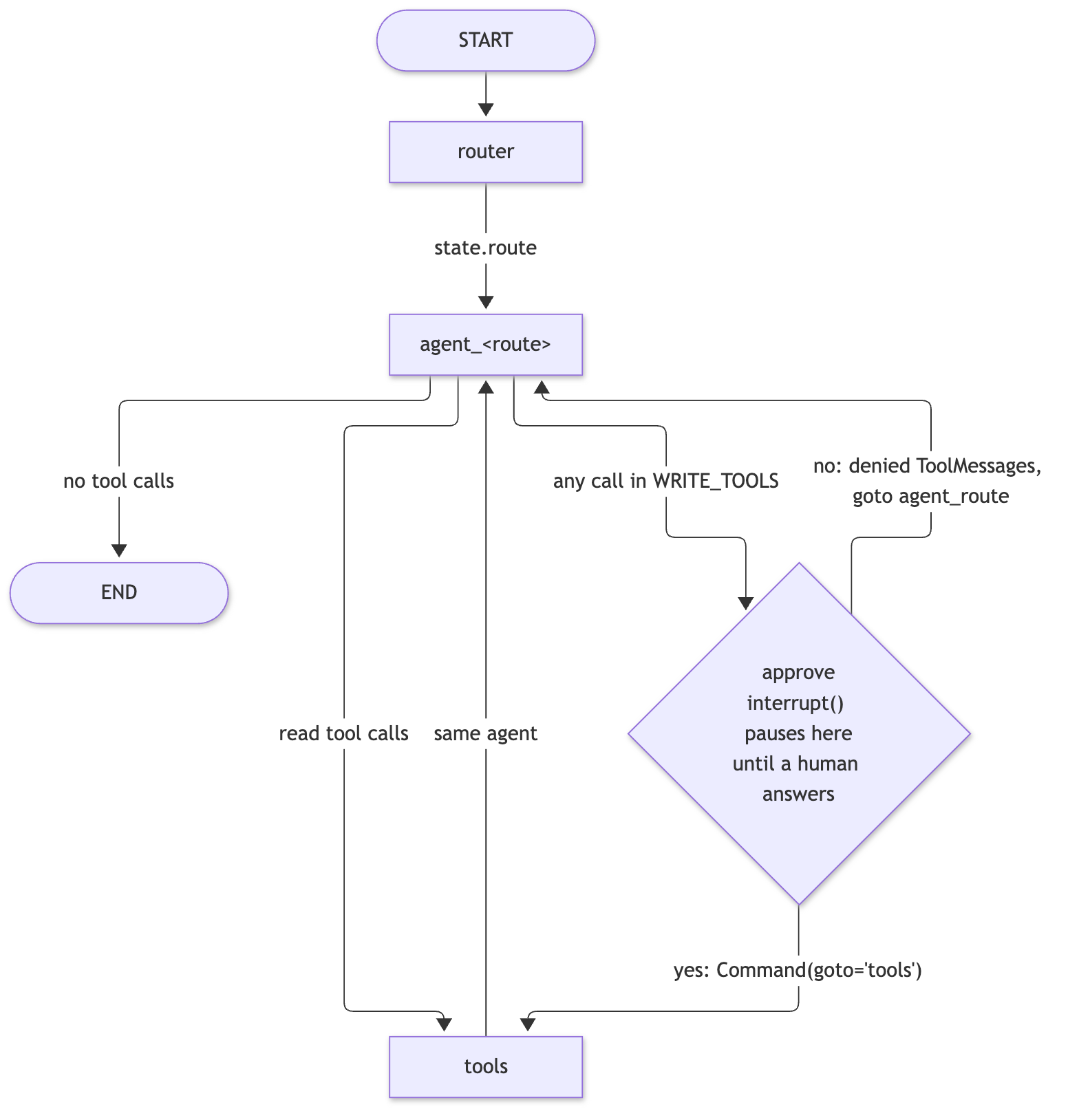
The decision of whether to ask is an edge function, after_agent. It looks at the tool calls on the model's last message:
agent_graph.py · after_agent
    def after_agent(state: State) -> str:
        """Edge: finish, run tools, or ask for approval first if any call writes.

        The check is by tool name and ignores the route, so it holds even when the 'general'
        route (which sees every tool) proposes a write.
        """
        calls = state["messages"][-1].tool_calls
        if not calls:
            return END
        return "approve" if any(c["name"] in WRITE_TOOLS for c in calls) else "tools"
No tool calls means the turn is over. If any call's name is in WRITE_TOOLS, go to approve. Otherwise go straight to tools. The check is by tool name and never looks at the route, so it can't be bypassed by the router sending a request somewhere unexpected.
The approval node itself:
agent_graph.py · approve
    def approve(state: State) -> Command:
        """Node: pause until a human approves or denies the write calls.

        interrupt() saves state to the checkpointer and stops the run; display.run() asks the
        user and resumes with True/False, which interrupt() then returns. The node re-runs
        from the top on resume, so keep everything before interrupt() side-effect free.
        """
        calls = state["messages"][-1].tool_calls
        if interrupt({"calls": [c for c in calls if c["name"] in WRITE_TOOLS]}):
            return Command(goto="tools")
        # Every tool call needs a reply message, so a denial answers the whole batch.
        denied = [
            ToolMessage(
                "The user denied this action. It was not done. Do not retry it.",
                tool_call_id=c["id"],
                name=c["name"],
            )
            for c in calls
        ]
        return Command(update={"messages": denied}, goto=f"agent_{state['route']}")
Three new ideas are in there.
interrupt()
interrupt(value) stops the graph at that line. LangGraph saves the current state, ends the run, and hands value (here, the list of write calls) back to whoever started it. Nothing after the line runs yet. When someone later resumes the run with an answer, interrupt() returns that answer and the node continues. Think of it as input() for a graph: the program stops and waits, except the "waiting" can survive the process ending.
Why a checkpointer is required
Stopping a run is easy. Picking it up again means remembering where it was: which node, what the messages looked like, what the model had just asked for. A checkpointer is the piece that saves that state after each step, keyed by a thread_id. Without one, the first run still stops and hands back the pending interrupt, but there is nothing to resume from: sending Command(resume=...) raises RuntimeError: Cannot use Command(resume=...) without checkpointer. This graph is compiled with the SQLite checkpointer from Part 7, which writes to a file, so a paused run isn't lost if the process stops. In this series the checkpointer is doing two jobs: memory between turns, and the pause point for approval.
Resuming, and Command
Command is how a node or a caller steers the graph, and it shows up in two different ways here.
Command(resume=value)is passed in by the caller to continue a paused run. Thevaluebecomes the return value ofinterrupt(). Here it'sTrueorFalse.Command(goto=..., update=...)is returned by a node instead of a plain state update.gotopicks the next node directly (no edge needed), andupdatechanges state at the same time. This is whyapprovehas no outgoing edges in the builder: it routes itself. Approved goes totools. Denied adds messages and goes back toagent_<route>.
One consequence that is easy to miss: on resume, the node runs again from the top. The first time it ran, it stopped at interrupt(). The second time, it runs from the first line, and this time interrupt() returns the answer instead of pausing. Any code before interrupt() runs twice, so it must have no side effects. In approve the only thing before it is reading the message list, which is safe.
Why a denial answers every call
When the model proposes tool calls, each one has an id, and the API expects each id to get a reply message before the model is called again. If I denied by simply going back to the agent with no replies, the next model call would be malformed. So a denial writes a ToolMessage for every call in the batch, telling the model the action wasn't done and not to retry it.
There's a limitation hiding in the word "every". If the model batches a harmless read and a write in the same turn, denying the write also denies the read, because the whole batch gets the denial message. The approval shows only the write calls, but the denial covers all of them. For a small tool with one-call-at-a-time prompting it rarely matters. It would matter in something larger.
The part that asks the human
The graph only pauses. The terminal code asks the question, in display.py:
display.py · confirm
def confirm(request: dict) -> bool:
    """Show the calls the graph paused on and ask the user to allow them."""
    print("\n  ⚠ Approval needed. The agent wants to run:")
    for call in request["calls"]:
        args = ", ".join(f"{k}={_clip(v)}" for k, v in call["args"].items())
        print(f"    {call['name']}({args})")
    return input("  Approve? [y/N] ").strip().lower() in {"y", "yes"}
Anything other than y or yes is a no. The default is denial. And run() handles the resume:
display.py · run
async def run(graph, user_input: str, config: dict | None = None) -> None:
    """Stream a graph run, printing only the messages each step adds.

    If the graph pauses with interrupt() it asks for approval, then resumes the same run.
    """
    payload = {"messages": [("user", user_input)]}
    while payload is not None:
        paused = None
        async for update in graph.astream(payload, config, stream_mode="updates"):
            for node, node_output in update.items():
                if node == "__interrupt__":  # a tuple of Interrupt objects
                    paused = node_output[0].value
                    continue
                node_output = node_output or {}
                if route := node_output.get("route"):
                    print(f"  ⇢ route: {route}")
                for message in node_output.get("messages", []):
                    show(message)
        payload = Command(resume=confirm(paused)) if paused else None
When the stream yields an __interrupt__ update, run remembers the payload and the stream ends. Then it calls confirm, wraps the answer in Command(resume=...), and streams again with the same config, which carries the thread_id. The loop runs until a pass finishes without pausing.
Approving, for real
I ran this twice, in two separate processes with two separate thread names, giving the same request. The test directory was inside a scratch project directory, and I've replaced my real path with ~/projects/demo below. Input was piped: the request, then the answer, then quit.
Run 1, answering y (one run; model output varies):
Loaded 26 tools. Thread 'doc-p6-yes': new conversation.
Type a prompt, or 'quit'.

you>   ⇢ route: filesystem
  → write_file(path='~/projects/demo/.doc_test/hello.txt', content='hello', mode='write')

  ⚠ Approval needed. The agent wants to run:
    write_file(path='~/projects/demo/.doc_test/hello.txt', content='hello', mode='write')
  Approve? [y/N]   ← { "path": "~/projects/demo/.doc_test/hello.txt", "size": 5, "new_hash": "2cf24dba5fb0a30e26e83b2ac5b9e29e1b161e5c1fa7425e73043362 … (171 chars)

The file `~/projects/demo/.doc_test/hello.txt` has been created with the content "hello". The file size is 5 bytes and its hash is `2cf24dba5fb0a30e26e83b2ac5b9e29e1b161e5c1fa7425e73043362938b9824`.
(Loaded 26 tools is the 19 read-only tools plus the 7 write tools.) The piped input doesn't echo, which is why the prompt and answer don't appear on their own lines. On disk afterwards, hello.txt existed and contained hello.
Run 2, answering n, after I cleared the directory:
Loaded 26 tools. Thread 'doc-p6-no': new conversation.
Type a prompt, or 'quit'.

you>   ⇢ route: filesystem
  → write_file(path='~/projects/demo/.doc_test/hello.txt', content='hello', mode='write')

  ⚠ Approval needed. The agent wants to run:
    write_file(path='~/projects/demo/.doc_test/hello.txt', content='hello', mode='write')
  Approve? [y/N]   ← The user denied this action. It was not done. Do not retry it.

The creation of the file `~/projects/demo/.doc_test/hello.txt` was denied. No file was created.
The directory listing afterwards was empty. The model read the denial message, didn't retry, and told me the file wasn't created. That last behavior comes from the wording of the ToolMessage; "Do not retry it" is there for a reason, since a small model otherwise tends to try again.
What went wrong
1. My first test wrote outside the allowed area. The scratch path I tried first was outside the roots the FileSystem server allows. After I approved, the tool returned a security_error saying the path was "outside the allowed roots". The graph did exactly what it should: it asked, I said yes, the tool ran. The refusal came from the MCP server's own sandbox. That is the useful lesson: the sandbox is the server's behavior, not something the graph provides. I moved the test directory inside the project and it worked.
2. My piped inputs got out of order. In one test the model skipped the tool call on a turn, so my scripted n had nobody to answer and was read as the next prompt. The general route then received "n", proposed a write on its own, and the approval gate stopped it. It was an accident, but a nice one: it showed the gate keys on the tool name and not the route. When you pipe input to a program that sometimes asks questions, the lines can shift.
3. The approval prompt hid part of the path. My first version of confirm cut each argument at 80 characters, with no marker. A long path was silently shortened in the middle, so the line I was approving didn't show everything I was approving. That is a real bug for a safety prompt, since you shouldn't approve a path you can't see. The fix is _clip(), which shows up to 300 characters and marks any cut with … (+N chars):
display.py · _clip
def _clip(value, limit: int = 300) -> str:
    """repr() that says when it cut something off, so a path is never silently truncated."""
    text = repr(value)
    return (
        text if len(text) <= limit else f"{text[:limit]}… (+{len(text) - limit} chars)"
    )
Even so, a long file body could still scroll off past the 300-character limit. The marker tells you something was cut, which is what matters.
What this is, and isn't
The approval step is a usability safeguard, not an authorization boundary. It makes me look at each write before it happens, and that's all. It does not stop a call from doing something harmful once I say yes, it does not check what the tool will really do, and a different front end that forgot to handle the interrupt would leave the graph paused forever (not running the write, but not finishing either). What actually restricts file access is the MCP server's sandbox, as the security_error showed. With this 7B model I also can't promise it will ask for the right write: it picks the tool, and I only see the call it picked.
Some things I'd still add: showing a diff for patch_file, letting a batch be approved call by call, and logging each approval. None is hard once you have the pause point.
Recap
- Write tools live in
WRITE_TOOLS, outside the curated read-only set, and onlyagent_graph.pybinds them. after_agentroutes toapproveif any call's name is inWRITE_TOOLS, whatever the route.interrupt()saves state and stops the run. It needs a checkpointer.Command(resume=...)continues it, and the node re-runs from the top, so code beforeinterrupt()must be side-effect free.Command(goto=..., update=...)letsapprovechoose its next node. A denial writes aToolMessagefor every call, which also denies any reads in the same batch.- This is a UX safeguard. The MCP server's sandbox is the real limit.
Next: Part 7 covers the SQLite checkpointer that made all of this possible.
Python 3.14.0, langgraph 1.2.20, langchain-mcp-adapters 0.3.2, langgraph-checkpoint-sqlite 3.1.3, qwen2.5-7b-instruct-mlx in LM Studio; 7 write tools behind approval.