Until now my agent forgot everything the moment I closed the terminal. In this part I replace LangGraph's in-memory checkpointer with a SQLite one, so a conversation survives a restart, and then deal with the side effect: saved history keeps growing, and a 7B model gets slow and confused when it has to read all of it.
Prerequisites: Part 3 for the graph, Part 6 for interrupt(), which depends on the same mechanism.
What a checkpointer is
A LangGraph graph is a set of nodes that each read the state and return an update. A checkpointer is an object that saves a snapshot of that state after every step of the run. Snapshots are filed under a thread id, a string you choose that names one conversation. Run the graph again with the same thread id and it starts from the saved state instead of an empty one. Use a different id and you get a fresh conversation.
So "memory" here is not a feature of the model. It is just the message list being stored between runs, and the next run starts with that list already in it.
In Part 3 I compiled the graph with MemorySaver, which keeps the snapshots in a Python dict. That is fine for learning, since follow-up questions work inside one session. But the dict dies with the process.
Swapping in SQLite
The langgraph-checkpoint-sqlite package ships AsyncSqliteSaver, which writes the same snapshots to a SQLite file. The graph code barely changes, because build_graph already takes the checkpointer as an argument. It is handed in at compile time:
agent_graph.py · build_graph (last lines)
    # The checkpointer saves state per thread_id, so follow-up questions remember earlier turns.
    return builder.compile(checkpointer=checkpointer)
The change is in main. The saver is an async context manager, so it opens the database and closes it for you:
agent_graph.py · main
async def main(thread_id: str) -> None:
    client = MultiServerMCPClient(MCP_SERVERS)
    tools = select_tools(await client.get_tools(), extra=WRITE_TOOLS)
    config = {"configurable": {"thread_id": thread_id}}

    # AsyncSqliteSaver writes a checkpoint after every graph step, so state survives restarts.
    async with AsyncSqliteSaver.from_conn_string(str(DB_PATH)) as saver:
        graph = build_graph(llm, tools, saver)

        saved = (await graph.aget_state(config)).values.get("messages", [])
        resumed = (
            f"resumed {len(saved)} saved messages" if saved else "new conversation"
        )
        print(f"Loaded {len(tools)} tools. Thread '{thread_id}': {resumed}.")
        print("Type a prompt, or 'quit'.\n")

        while (prompt := input("you> ").strip()) not in {"quit", "exit"}:
            await run(graph, prompt, config)
Three things to notice:
configcarries thethread_id. Everygraph.astream(...)call gets it, and that is how the checkpointer knows which conversation to load and save.graph.aget_state(config)reads the saved state without running anything. I use it only to print whether this is a resumed or a new conversation.- The
--thread NAMEflag (defaultdefault) fills inthread_id.DB_PATHpoints atmemory.dbnext to the script, and deleting that file is how you make the agent forget everything.
Here is how the pieces fit together, with the same node names as the code:
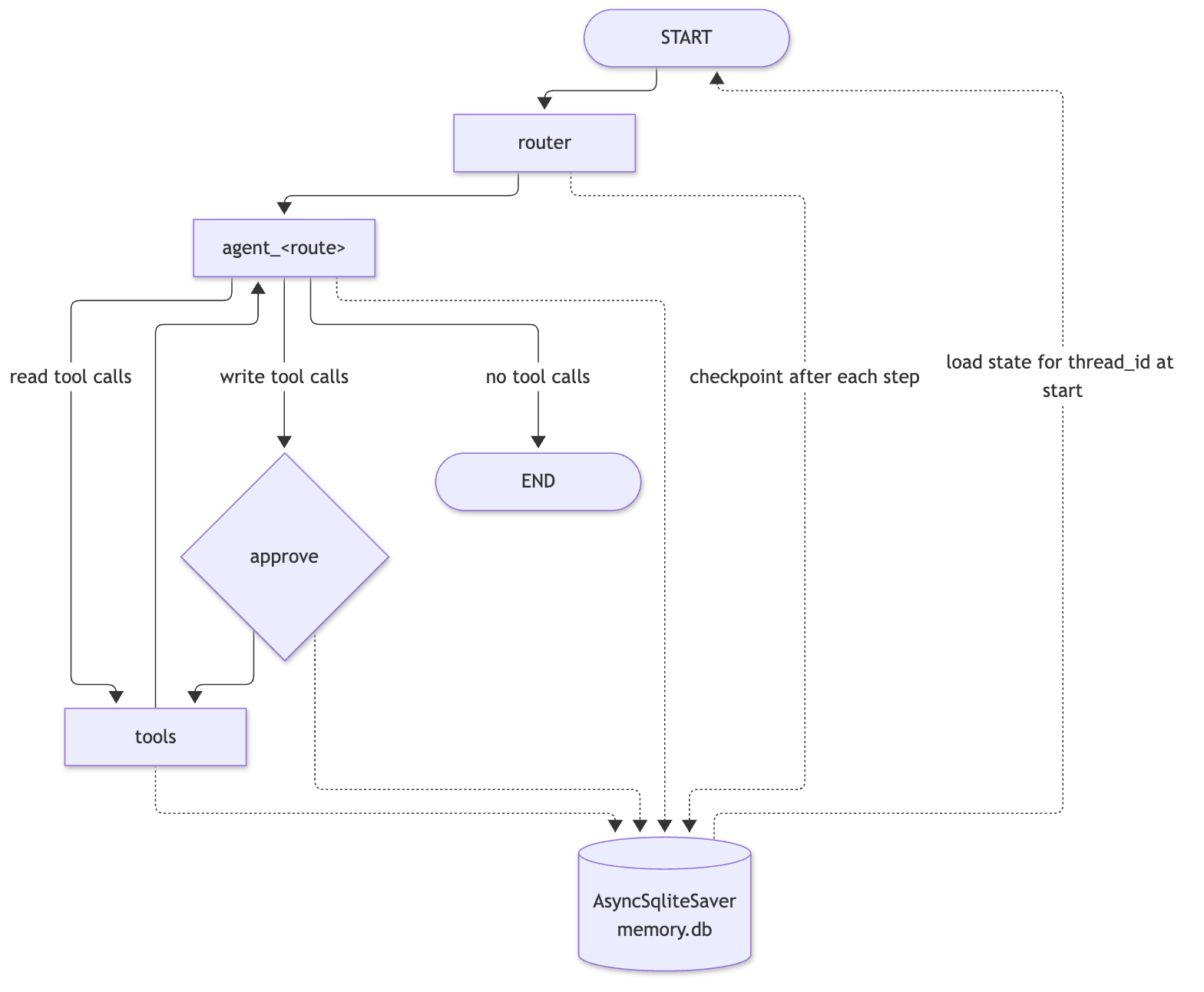
The dotted lines are the checkpointer. It is not a node, and the graph's logic does not call it. LangGraph writes to it between steps.
Proving it with real runs
I ran the program three times. Each is one run of a 7B model, so your wording will differ. Run 1 starts thread doc-mem and asks about an IP:
Loaded 26 tools. Thread 'doc-mem': new conversation.
Type a prompt, or 'quit'.

you>   ⇢ route: geoip
  → validate_ip(ip_address='8.8.8.8')
  ← { "ip_address": "8.8.8.8", "valid_format": true, "is_public": true, "classification": "public" }

The IP address 8.8.8.8 is a valid public IP address.
Run 2 is a brand-new process with the same thread:
Loaded 26 tools. Thread 'doc-mem': resumed 4 saved messages.
Type a prompt, or 'quit'.

you>   ⇢ route: geoip

You asked about the IP address 8.8.8.8 earlier.
Four saved messages: my question, the model's tool call, the tool result, and the final answer. (The "26 tools" is the 19 curated read-only tools plus the 7 write tools behind approval.) Run 3 uses a different thread:
Loaded 26 tools. Thread 'doc-other': new conversation.
Type a prompt, or 'quit'.

you>   ⇢ route: geoip

To help you, I need to know which IP address you're referring to. Could you please provide the IP address you asked about earlier?
The you> prompt sits on the same line as the output because I piped the input; in a real terminal your Enter key supplies the newline.
One detail in the transcripts is worth pausing on. The follow-up question was routed to geoip, not general, even though the router prompt says follow-up questions belong to general. It worked anyway, because the answer was in the conversation, but it shows the router is a 7B model's best guess, as Part 5 measured.
With this 7B model, recall worked in this run, but "remembers" only means the old messages are in the prompt. The model can still ignore or misread them.
What else the checkpointer does
The same snapshots are what let a paused approval resume. When approve calls interrupt(), LangGraph saves the state and stops; the resume call finds that snapshot by thread id and continues. Without a checkpointer, interrupt() has nowhere to put the paused run. That is the connection to Part 6.
memory.db holds the full content of your conversations, including raw tool results such as file contents. Don't commit it, don't share it, and add it to .gitignore. SQLite also keeps -wal and -shm sidecar files next to it while the program runs.
The cost: history grows, and so does the prompt
Once history persists, every turn carries everything before it. The messages in state include the raw tool results. One directory listing was about 4,000 characters in my earlier output, and a page fetch or a file read can be larger. After a few turns, most of what I send to a 7B model is stale tool output it no longer needs, and local models get slower and more confused as the context fills.
I did not want to delete anything from the saved state, because the full record is useful for debugging and for the checkpointer. The fix is to shorten old tool results only in the copy of the history that I send to the model.
compact()
context.py · compact
KEEP_TURNS = 2  # tool results from the last N user turns are left untouched
KEEP_CHARS = 200  # how much of an older tool result survives as a hint


def compact(
    messages: list[BaseMessage],
    keep_turns: int = KEEP_TURNS,
    keep_chars: int = KEEP_CHARS,
) -> list[BaseMessage]:
    """Return a copy with tool results older than the last `keep_turns` user turns shortened.

    Only the content changes, so every tool call still has its matching tool message.
    """
    user_turns = [i for i, m in enumerate(messages) if isinstance(m, HumanMessage)]
    if len(user_turns) <= keep_turns:
        return list(messages)
    cutoff = user_turns[-keep_turns]

    compacted = []
    for i, message in enumerate(messages):
        if i < cutoff and isinstance(message, ToolMessage):
            text = text_of(message.content)
            if len(text) > keep_chars:
                head = re.sub(r"\s+", " ", text[:keep_chars]).strip()
                message = message.model_copy(
                    update={
                        "content": f"[older tool result trimmed, {len(text)} chars] {head}…"
                    }
                )
        compacted.append(message)
    return compacted
It finds where each user turn starts, picks the cutoff at the start of the second-to-last one, and for any ToolMessage before that point longer than 200 characters, swaps in a stub: a note saying how long it was, plus the first 200 characters on one line. Everything else passes through unchanged.
Two details matter:
- Only the content changes. The
AIMessagethat made a tool call still has its matchingToolMessage. Chat APIs reject a tool call without a reply, so dropping messages would break the request; shortening the text does not. model_copymakes a new message. The originals in state are never mutated.
It is applied in one place, the agent node:
agent_graph.py · make_agent (inside agent)
        async def agent(state: State) -> dict:
            # The system prompt is added on every call but not stored in state; old tool
            # results are shortened for the model only (state keeps them in full).
            messages = [SystemMessage(prompt), *compact(state["messages"])]
            return {"messages": [await model_with_tools.ainvoke(messages)]}
State, and therefore memory.db, keeps everything. The model sees less.
Checking it directly
I built a synthetic history of four user turns, each with one 5,000-character tool result, and ran compact() on it. This is a direct check of the function, not a model run:
before: 20088 after: 10570
241 [older tool result trimmed, 5000 chars] xxxxxxxxxxxxxxxxxxxxxxxxxxxxxx
241 [older tool result trimmed, 5000 chars] xxxxxxxxxxxxxxxxxxxxxxxxxxxxxx
5000 xxxxxxxxxxxxxxxxxxxxxxxxxxxxxxxxxxxxxxxxxxxxxxxxxxxxxxxxxxxxxxxxxxxxxx
5000 xxxxxxxxxxxxxxxxxxxxxxxxxxxxxxxxxxxxxxxxxxxxxxxxxxxxxxxxxxxxxxxxxxxxxx
original unchanged: True
The two older results became 241-character stubs (the 200-character head plus the prefix), the newest two stayed whole, and the original messages were untouched. An earlier check with real tool output gave the same shape: 20,040 down to 10,522 characters sent to the model.
compact() counts turns and characters, not tokens, so it is a rough guard. One huge result in the current turn is never trimmed and can still overflow the context. Only tool results are trimmed, not long user or assistant messages. And the model cannot answer detailed questions about a trimmed result; it would have to run the tool again. I did not test whether it does that on its own.
Recap
- A checkpointer saves state after each graph step under a
thread_id;AsyncSqliteSaverputs it inmemory.db, so memory survives restarts. --thread NAMEpicks the conversation; a different name starts empty, and deleting the file forgets everything.aget_state(config)lets the program say whether it resumed or started new.- The same checkpointer is what makes
interrupt()resumable. compact()shortens tool results older than the last 2 user turns, only in the request to the model, never in saved state.
Next: Part 8 cleans up what the terminal prints.
langgraph 1.2.20, langgraph-checkpoint-sqlite 3.1.3, Python 3.14.0, qwen2.5-7b-instruct-mlx in LM Studio.