The one-shot agent from Part 1 works, but I could not have told you how. One call to create_agent produced a loop that picks tools, runs them and answers. In this part I rebuild that loop by hand with LangGraph's StateGraph, so each moving piece (state, nodes, edges, the tool loop, memory) is something I wrote and can change.
Prerequisites: Part 1 (the prebuilt agent and the MCP tools) and Part 2 (why the tool list and system prompt matter).
What I was replacing
This is the whole agent from Part 1. Everything interesting happens inside one line.
agent.py · main
async def main(prompt: str) -> None:
    client = MultiServerMCPClient(MCP_SERVERS)
    tools = select_tools(await client.get_tools())
    print(f"Using {len(tools)} tools\n")

    agent = create_agent(llm, tools, system_prompt=SYSTEM_PROMPT)
    await run(agent, prompt)
create_agent returns a compiled LangGraph graph. I had no idea what was in it, and I wanted to be able to add a step in the middle of the loop (a router, later an approval pause). You can't add a step to a thing you can't see, so I wrote the same graph myself in agent_graph.py.
The shape of the loop
An agent with tools is a loop between two steps: ask the model, and run the tools it asked for. It stops when the model answers without asking for a tool.
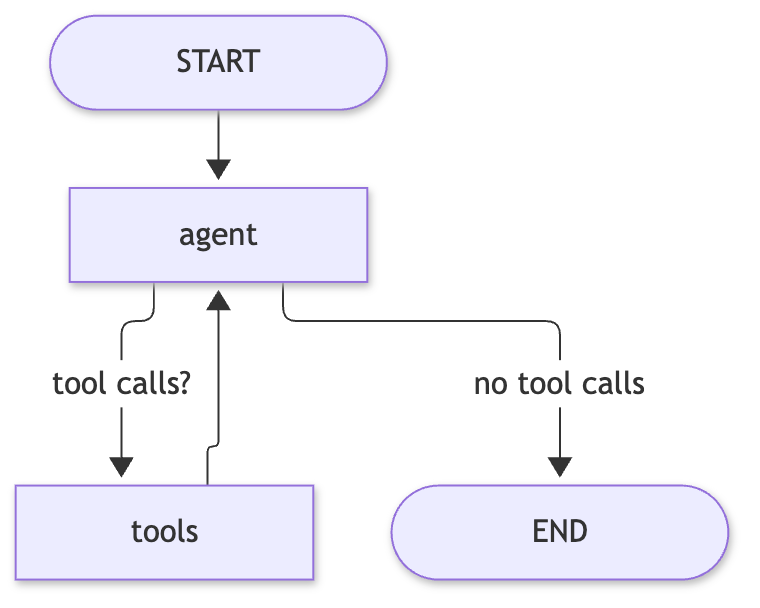
My first hand-built version was exactly this: START -> agent --(tool calls?)--> tools -> agent -> ... -> END. The names in the diagram are the names in the code.
LangGraph in five words
Before the code, the vocabulary, in plain terms.
- State is the data that flows through the graph. Every node reads it and returns changes to it.
- Reducer is the rule for merging a node's return value into state. By default a returned key overwrites the old value. A reducer changes that, for example "append".
- Node is a function that takes the state and returns an update.
- Edge connects nodes. A conditional edge calls a function to choose the next node.
- Checkpointer saves the state after each step, keyed by a thread_id, so a later call on the same thread starts from the saved state.
State and the reducer
agent_graph.py · State
class State(TypedDict):
    # add_messages is a reducer: node return values are appended, not overwritten.
    messages: Annotated[list[BaseMessage], add_messages]
    route: str  # set by the router node, overwritten on every turn
route arrives in Part 4; the first version had only messages. The important part is Annotated[..., add_messages]. Without it, an agent node returning {"messages": [reply]} would replace the whole conversation with one message. With the reducer, the returned list is appended (and a message with an id that already exists is replaced rather than duplicated). That is why every node in this file returns only what is new.
The agent node
The agent node asks the model what to do next. It binds the tools to the model with bind_tools, which sends their names, descriptions and argument schemas with each request so the model can emit tool calls.
agent_graph.py · make_agent (the node body; the final file builds this once per route)
        model_with_tools = model.bind_tools(group)
        prompt = f"{SYSTEM_PROMPT}\n\n{ROUTE_HINTS.get(route, '')}".strip()

        async def agent(state: State) -> dict:
            # The system prompt is added on every call but not stored in state; old tool
            # results are shortened for the model only (state keeps them in full).
            messages = [SystemMessage(prompt), *compact(state["messages"])]
            return {"messages": [await model_with_tools.ainvoke(messages)]}
In the first version this was simpler: model.bind_tools(tools) with all the tools, and [SystemMessage(SYSTEM_PROMPT), *state["messages"]]. In the final file group is one route's tools, the prompt gets a route hint (Part 4) and compact() shortens old tool results (Part 7).
Two design choices are worth noticing:
- The system prompt is prepended on every call and never stored in state. State holds the conversation, not my instructions, so changing the prompt takes effect on the next turn, even in a thread that already has history.
- The node returns a one-element list. The reducer does the appending.
The tools node and the loop
LangGraph ships ToolNode. Given the tool list, it reads the tool calls on the last message, runs them, and returns the results as ToolMessages that the reducer appends.
agent_graph.py · build_graph (wiring, with the later nodes cut)
    builder = StateGraph(State)
    # ...
    builder.add_node(
        "tools", ToolNode(tools)
    )  # runs the tool calls on the last message
    # ...
    builder.add_edge(START, "router")
    # ...
    # Tool results go back to the same agent that asked for them.
    builder.add_conditional_edges("tools", agent_for_route, agent_nodes)
In the first version the last two edges were add_edge(START, "agent") and add_edge("tools", "agent"): a fixed edge, because there was only one agent. Part 4 explains why that edge became conditional.
The decision after the agent runs is a conditional edge: a function that looks at state and returns the name of the next node. This is the real function in the final file:
agent_graph.py · after_agent
    def after_agent(state: State) -> str:
        """Edge: finish, run tools, or ask for approval first if any call writes.

        The check is by tool name and ignores the route, so it holds even when the 'general'
        route (which sees every tool) proposes a write.
        """
        calls = state["messages"][-1].tool_calls
        if not calls:
            return END
        return "approve" if any(c["name"] in WRITE_TOOLS for c in calls) else "tools"
The first version was the first half of this: no tool calls means END, otherwise "tools". The "approve" branch is Part 6.
How it all fits: the model replies with an AIMessage. If its tool_calls list is empty, that reply is the answer and the graph ends. If not, ToolNode runs the calls, appends the results, and control returns to the agent, which now sees the results and decides again.
Memory: the checkpointer
The last line of build_graph compiles the graph with a checkpointer.
agent_graph.py · build_graph
    # The checkpointer saves state per thread_id, so follow-up questions remember earlier turns.
    return builder.compile(checkpointer=checkpointer)
The first version used MemorySaver, which keeps checkpoints in RAM. Each invocation passes a thread_id in its config:
agent_graph.py · main
config = {"configurable": {"thread_id": thread_id}}
Same thread_id, same conversation. A follow-up like "how many of those were folders?" works because the saved messages are already in state when the new turn starts. MemorySaver forgot everything when the process exited; Part 7 swaps it for SQLite.
What the prebuilt agent hid from you
Writing it out showed me four things create_agent had been deciding for me:
- The loop is a graph, and the stop condition is "no tool calls". There is no iteration counter in my version. A model that keeps calling tools keeps looping (LangGraph has a recursion limit as a backstop, but I never tuned it).
- Where the system prompt goes. It is not part of the conversation unless you put it there. I choose to add it per call.
- State is yours. The prebuilt state is a list of messages. Mine can also carry a
route, and that is what made routing possible. - Memory is opt-in. Without a checkpointer, every call starts empty. The one-shot
agent.pyhas no memory by design.
The most useful learning trick was streaming with stream_mode="updates", which yields only what each node just added. Part 8 covers display.run(); it is why you see one line per step below.
What it costs
More code to own. The prebuilt agent is about one line; the graph with routing, approval and SQLite is around 190 lines in one file. I accepted that because the point of this project was to learn and to control the loop. If you only need a tool-calling agent, create_agent is the right choice, and you can adopt the hand-built graph when you need to change the loop.
A real run
One run of the final graph on a read-only prompt (the ⇢ route: line comes from the router added in Part 4). Model output varies between runs.
you>   ⇢ route: geoip
  → validate_ip(ip_address='8.8.8.8')
  ← { "ip_address": "8.8.8.8", "valid_format": true, "is_public": true, "classification": "public" }

Yes, 8.8.8.8 is a valid public IP address.
Read it as the diagram: the agent asked for validate_ip, tools ran it (←), control returned to the agent, and it answered without a tool call, which ended the graph.
langgraph 1.2.20, langchain 1.4.10, langchain-openai 1.7.4, langchain-mcp-adapters 0.3.2, qwen2.5-7b-instruct-mlx in LM Studio.
Recap
create_agentreturns a graph; building it by hand withStateGraphmakes the loop visible and changeable.- State plus a reducer (
add_messages) means nodes return only what is new. - The loop is
agent-> conditional edge ->tools->agent, ending when the model makes no tool call. - The system prompt is added per call, not stored; a checkpointer plus
thread_idgives memory. - The cost is code you now own.
Next: Part 4 adds a router so each request only sees one group of tools.